
ICPD Submission Guide
How to prepare and deposit crop phenotyping data in the Indian Crop Phenome Database (ICPD). Written for external data submitters. Read this page first: it shows the whole route on one page and what to have ready.
Start with registration Web-based submission
Three tags are used throughout this guide: MANDATORY the submission cannot be completed without this field. RECOMMENDED the submission can be completed without this field but it is recommended to be filled. NEW IN v3.0 introduced in this version of the guide.
Complete submission flow #
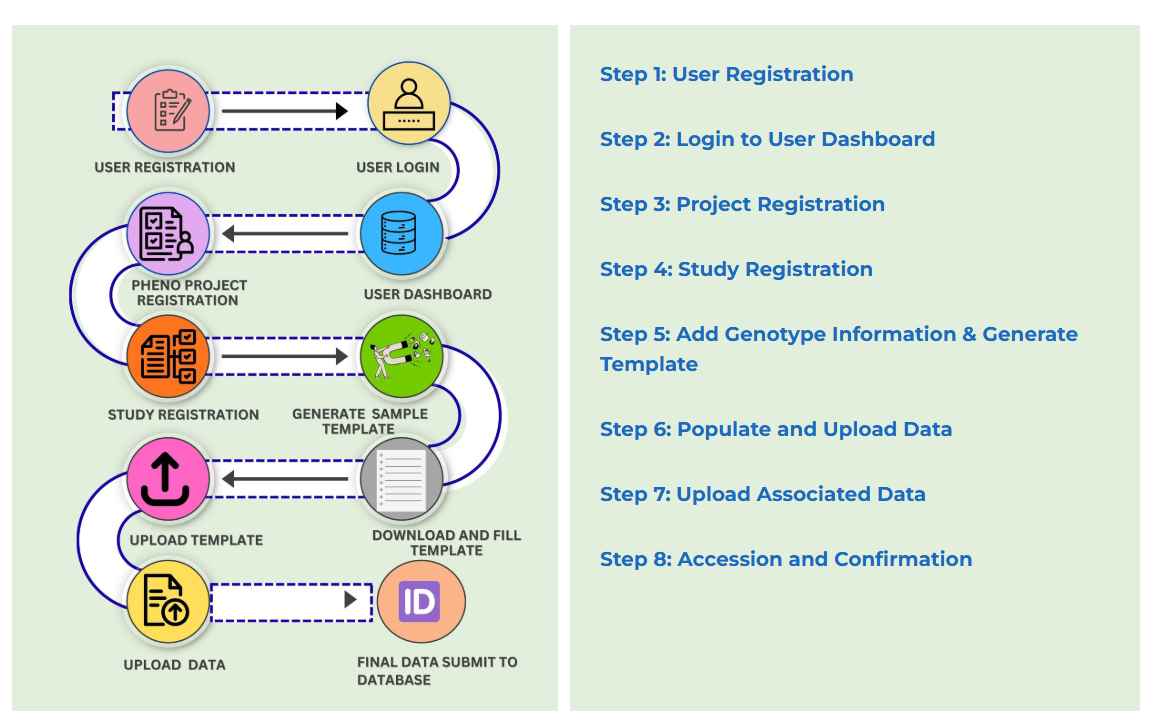
The route, step by step #
| Stage | What you do | What you get | Read |
|---|---|---|---|
| Account | Register, activate your account from the email link, and log in. | Access to your dashboard | Section 5 |
| Step 1 | Register a phenoproject: project details and the crops studied. | Phenoproject accession PPJ_nnnnnn | Step 1 |
| Step 2 | Register a study: one site in one season. Add conditions, treatments, traits and authors. | Study accession PST_nnnnnn | Step 2 |
| Step 3 | Generate and download the template for the study. | Template CSV with the identifying columns filled in | Step 3 |
| Step 4 | Fill in the template and upload it. The file is checked automatically. | Data file accession PDT_nnnnnn | Step 4 |
| Step 5 | Upload supporting data, including plant passport data. | A study others can interpret and reuse | Step 5 |
| After you submit | Curator review, then public release on the date you declared. | A curated, released record | Section 10 |
If the web interface cannot be used, the template-based route is available, but it takes longer because the metadata has to be checked by hand.
How ICPD records are connected #
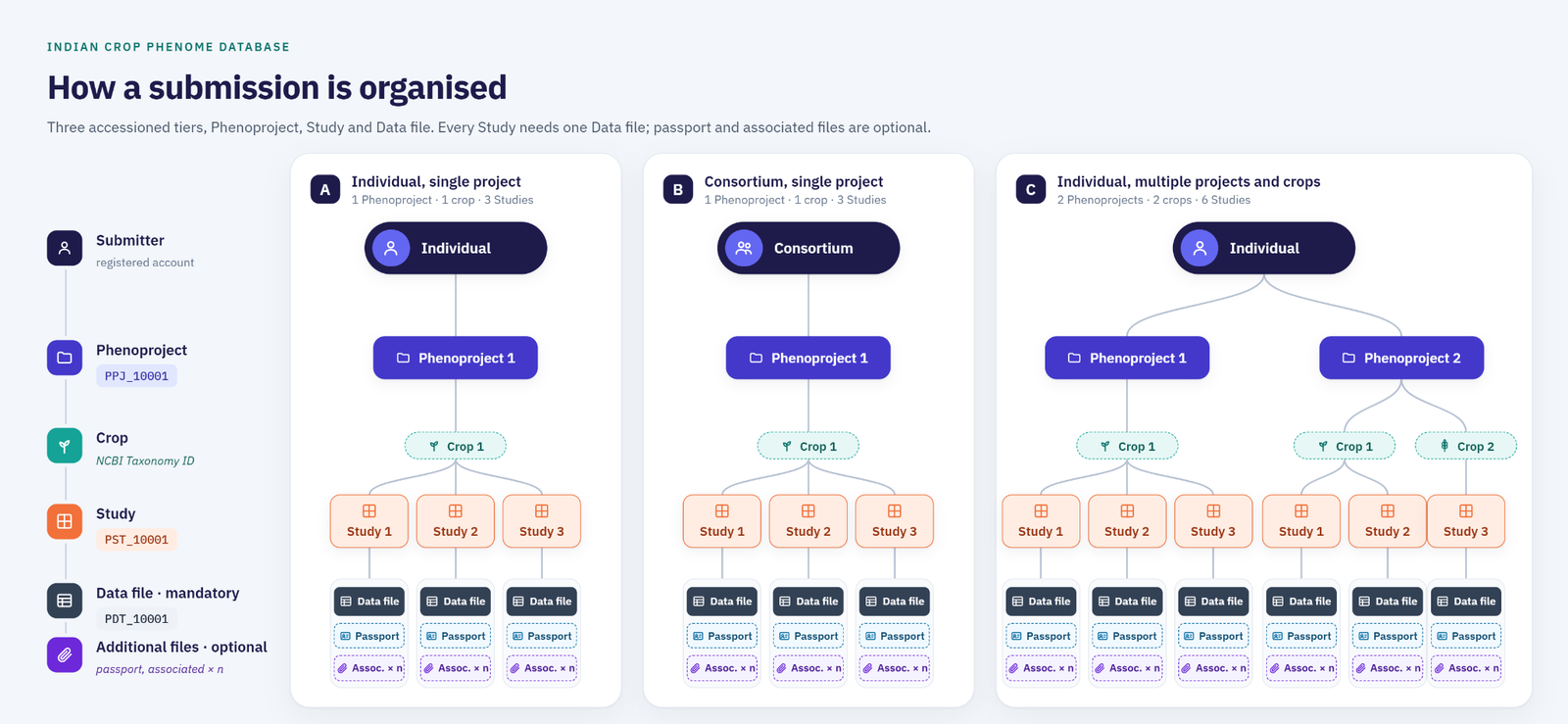
A submission is organised into three linked record types. A phenoproject may contain one or many studies, and each study holds one or more data files. The accession numbers (PPJ_, PST_, PDT_) are assigned by ICPD, are permanent, and must be quoted in full without spaces. Section 3 explains the model.
Submission checklist #
Tick each item before you open the submission forms. Submissions usually stall because one of these was not available at registration.
Account and contributor details
Project and study description
Traits and methods
Genotypes and data files
Keep names and IDs consistent #
Most returned submissions have a mismatch between two files or two fields. These are the places where the same value must be identical.
| What | Rule | Read |
|---|---|---|
| Genotype name | The genotype list you give in Step 3, the data file and the plant passport file. N22 and N-22 count as two different genotypes, and a duplicated name cannot be resolved. | Step 3, 9 |
| Study identifier | Always the PST_ accession issued by the portal. Do not build identifiers from institute names, years or trait names. | 3.2 |
| Genebank accession | Written closed and without a space, as in IC558055. Check that a spreadsheet has not turned it into a number or a date. | 4.2, 9 |
| Dates | YYYY-MM-DD everywhere (ISO 8601). | 4.2 |
| Units and scales | Every numeric trait carries a unit, or a named scale with its range and direction. | 4.2 |
| Missing values | NA, one token only. Never leave a cell blank, and never use zero for a value that was not measured. | 4.2 |
| Template columns | Do not add, remove, rename or reorder columns, and do not change the file format. | Step 3 |
Document information
| Document title | ICPD Submission Guide |
|---|---|
| Document reference | ICPD-SG-01 |
| Version | 3.0 |
| Supersedes | SOP-ICPD_v2.0 (2024) |
| Date of issue | September 6th, 2026 |
| Next review due | October 10th , 2026 |
| Document owner | Team ICPD |
| Approved by | Head IBDC |
| Audience | External data submitters |
| Related documents | IBDC-DWS-01 Data Withdrawal and Suppression Request Form |
Revision history #
| Version | Date | Summary of changes |
|---|---|---|
| 1.0 | Dec, 2022 | First release. |
| 2.0 | Nov 21, 2025 | This update brings several key enhancements aimed at improving usability, security, and project tracking. The major upgrades include: Improved and updated Policy Page Complete integration of the data submission and curation workflow CAPTCHA implementation for secure form submissions Addition of the Safflower Mission Project (KUSUM) track Updated and refined menu bar Correction and validation of internal links across the platform With these upgrades now live, ICPD offers a more streamlined, secure, and user-friendly experience for all users. |
| 3.0 | Sept 10th, 2026 | Version 3.0 records a substantial rebuild of the ICPD platform together with a corresponding revision of this guide. The home page has been redesigned, an introductory video has been added, and the submission statistics have been reworked to give a clearer picture of the holdings. A new project page brings phenoprojects, studies and data files together through a knowledge graph, so all records associated with a project can be traced from a single view. Interoperability has been extended through the use of persistent external identifiers: crops are identified by NCBI Taxonomy identifier, institutions by ROR identifier, and plant structures, developmental stages and traits by Plant Ontology and Crop Ontology terms. Genotypes are now linked to their genebank accession records, and a genotype search page and an ontology curation workflow have been added. A data withdrawal and suppression request form is now available to submitters. This guide adds sections on curation, release, licensing, correction and withdrawal, and citation. |
1. How to use this guide
This guide explains how to prepare and deposit crop phenotyping data in the Indian Crop Phenome Database. It is written for the submitter. It is not a procedural document for IBDC staff; the internal procedures for validation, curation, release and withdrawal are held in separate SOPs listed above.
Three conventions are used throughout.
- MANDATORY the submission cannot be completed without this field.
- RECOMMENDED the submission can be completed without this field but its recommended to be filled
- NEW IN v3.0 introduced in this version of the guide.
2. About ICPD
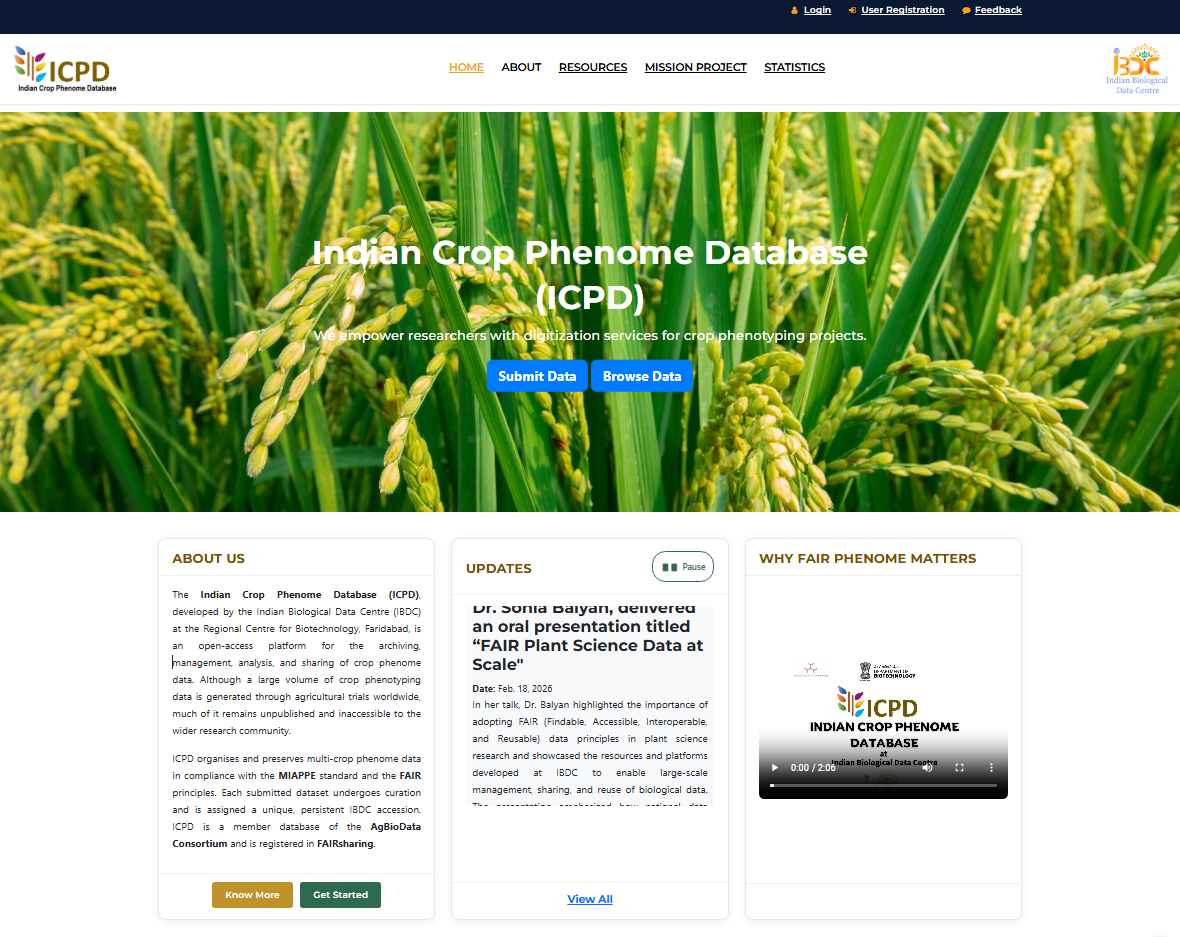
The Indian Crop Phenome Database (ICPD), developed by the Indian Biological Data Centre (IBDC) at the Regional Centre for Biotechnology, Faridabad, is an open-access platform for the archiving, management, analysis, and sharing of crop phenome data. Although a large volume of crop phenotyping data is generated through agricultural trials worldwide, much of it remains unpublished and inaccessible to the wider research community. ICPD addresses this gap by providing a centralized, user-friendly platform, open to researchers everywhere, that organizes and preserves multi-crop phenome data in compliance with the MIAPPE standard and the FAIR principles — findable, accessible, interoperable, and reusable. Each submitted dataset undergoes curation and is assigned a unique, persistent IBDC accession, and the platform supports both open and managed access submission modes. ICPD operates under a CC BY-NC-SA licensing framework that ensures proper attribution while supporting ethical, non-commercial reuse. ICPD is a member database of the AgBioData Consortium and is registered in FAIRsharing.Data deposited in ICPD receive persistent IBDC accession numbers. The portal is available at https://ibdc.dbt.gov.in/icpd/.
3. The ICPD data model
3.1 Record types #
A submission to ICPD is organised into three linked record types. Understanding this hierarchy before you start will save considerable time, because the boundaries between a phenoproject and a study, and between one study and the next, determine how your data can later be found and combined with other people's data.
| Record type | Accession | Definition |
|---|---|---|
| Phenoproject | PPJ_nnnnnn | A research plan with defined aims and objectives, typically corresponding to a funded programme. May involve one principal investigator or a consortium, and one or many crops. |
| Study | PST_nnnnnn | A single experiment or trial carried out at one site in one season, under one experimental design, on a defined set of genotypes. |
| Data file | PDT_nnnnnn | The observation values recorded within a study, together with the identifiers that locate each value in the trial. |
3.2 Accession number format #
Accession numbers are assigned automatically by ICPD and are permanent. Once issued, an accession number is never reassigned to a different record, even if the original record is later suppressed or withdrawn.
| Record type | Format | Example | Assigned when |
|---|---|---|---|
| Phenoproject | PPJ_ followed by six digits | PPJ_100042 | On successful completion of Step 1 |
| Study | PST_ followed by six digits | PST_100118 | On successful completion of Step 2 |
| Data file | PDT_ followed by six digits | PDT_100377 | On successful upload in Step 4 |
Always quote accession numbers in full and without spaces. Do not construct accession numbers yourself, and do not derive study identifiers from institute abbreviations, years or trait names. The only valid study identifier is the PST_ accession issued by the portal.
3.3 One study per site and season #
A study covers one site in one growing season. If the same trial was grown at three locations over two years, register six studies under one phenoproject. Do not record multiple locations or multiple years within a single study.
This follows the convention used internationally for multi-environment trials. It keeps the environmental description, the experimental design and the observation units unambiguous for each environment, and it allows others to select exactly the environments they need when reusing your data. The phenoproject record is what holds the set together.
3.4 Relationship to MIAPPE #
The ICPD metadata model is aligned with MIAPPE, the Minimum Information About a Plant Phenotyping Experiment standard (www.miappe.org). ICPD targets MIAPPE v1.2. The ICPD phenoproject corresponds to the MIAPPE investigation, the ICPD study to the MIAPPE study, and the ICPD data file to the MIAPPE observation and observed variable sections.
Trait, developmental stage, plant anatomy and treatment terms are drawn from the Planteome ontologies (planteome.org) and from Crop Ontology (cropontology.org), which are the ontologies MIAPPE recommends for these fields.
4. Before you begin
4.1 What to gather first #
Assemble the following before opening the submission forms. Submissions that stall usually do so because one of these was not available at the time of registration.
| Item | Notes |
|---|---|
| Project title, abstract, grant number, funding agency | As written in the sanctioned proposal |
| Names, affiliations, emails and ORCID iDs of all contributors | ORCID for every contributor, not only the submitter |
| Crop scientific names and NCBI Taxonomy identifiers | One entry per crop in the phenoproject. Multiple crops can be added |
| Trial site name, and its latitude, longitude and altitude | Decimal degrees, WGS 84 |
| Sowing and harvest dates, and dates of other management events | Start and end date of the trial and details of Irrigation, fertiliser, pesticide, transplanting can also be added |
| Field book or plot plan | Block, row and column position of every plot (submitted as associated file) |
| Genotype list with source institute and holding accession numbers | For example NBPGR IC or EC numbers, written closed and without a space, as in IC558055 |
| For every trait: the measurement method and the unit or scale | Including the reference for any scoring scale used |
| Associated publication DOI or PMID, if any | Optional |
4.2 Formatting conventions #
These conventions apply to every field and every file you submit.
| Item | Required form | Notes |
|---|---|---|
| Dates | YYYY-MM-DD | ISO 8601. Write 25 October 2022 as 2022-10-25. Do not use 25/10/2022 or Oct, 25, 2022 |
| Date and time | YYYY-MM-DDThh:mm | Local time. State the time zone in the study description if it is not IST |
| Decimal separator | Full stop | 12.5, not 12,5 |
| Thousands separator | None | 12500, not 12,500 |
| Geographic coordinates | Decimal degrees, WGS 84 | 28.4089, 77.3178. Negative for south and west |
| Units | SI or a stated scale | Every numeric trait must carry a unit or a named scale. Added in the methods |
| Ontology identifiers | CURIE form, prefix and colon | TO:0000276, PO:0009051. Do not use the underscore form TO_0000276 |
| Missing values | NA | One token only |
| File encoding | UTF-8 | Save as UTF-8 CSV, not as ANSI or UTF-16 |
| Delimiter | Comma | Fields containing commas must be quoted |
4.3 Choosing ontology terms #
ICPD records traits, developmental stages, plant anatomy and treatments using ontology terms rather than free text, so that a search for a trait returns data from every submitter who measured it, regardless of the words they happened to use.
Work in this order.
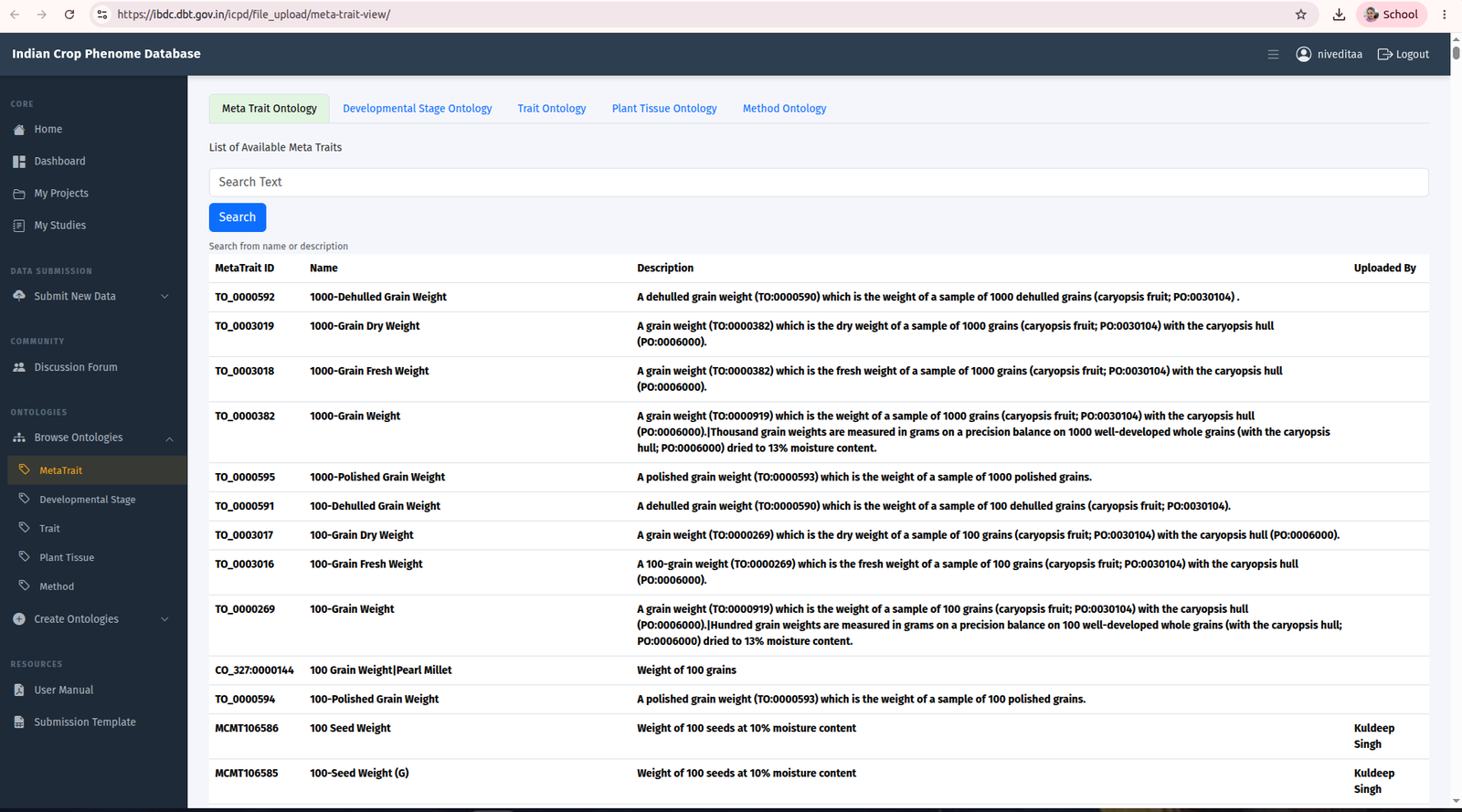
- Search the existing term in the Browse Ontology tool.
- If your exact term is absent, consider whether an existing broader term is scientifically adequate. In most cases it is.
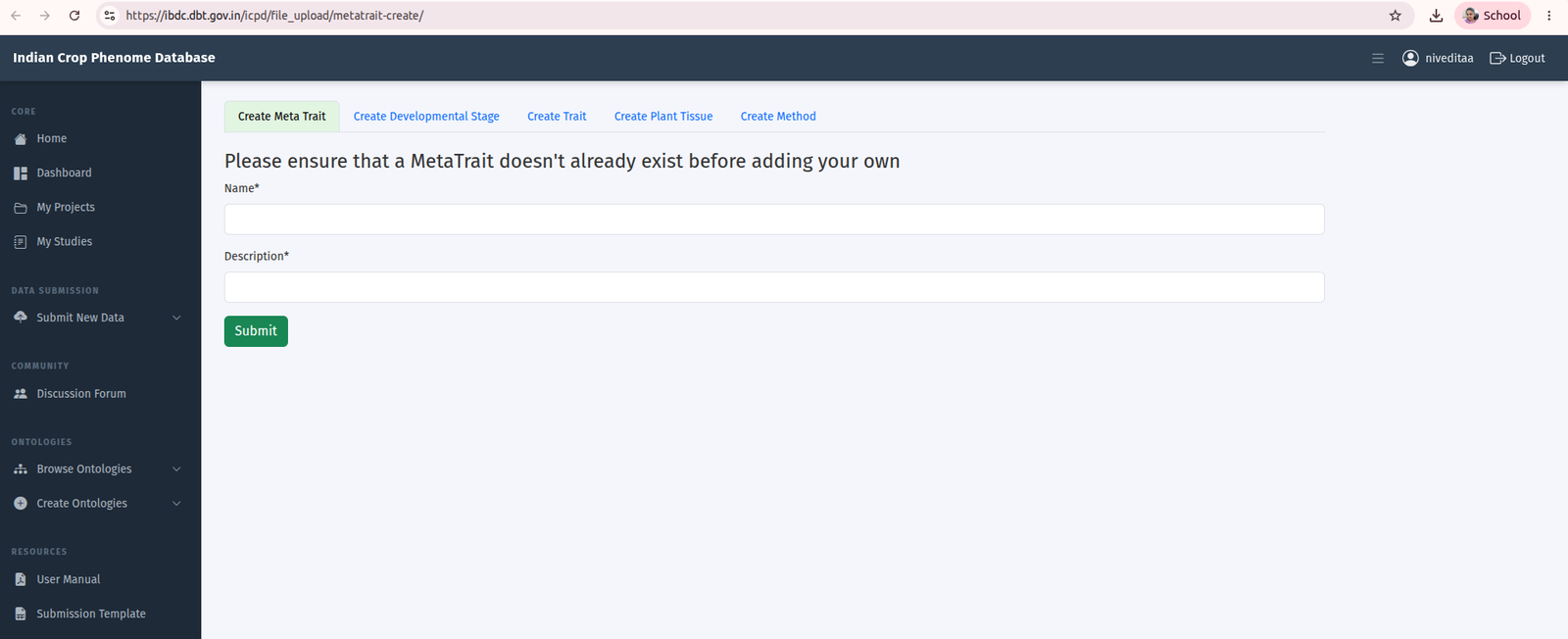
- Only if no suitable term exists, propose a new term through Create Ontology Term.
Proposed terms are accepted into ICPD as provisional terms and are flagged as such in your record so that your submission is not delayed. They are then reviewed against the Plant Trait Ontology, Plant Ontology, Plant Experimental Conditions Ontology and Crop Ontology, and are either mapped to an existing term or promoted. You may be contacted during that review.
5. Getting started
The overview of steps required for the initiate and complete the phenome data submission to ICPD are summarised in Figure 4.
5.1 User registration #
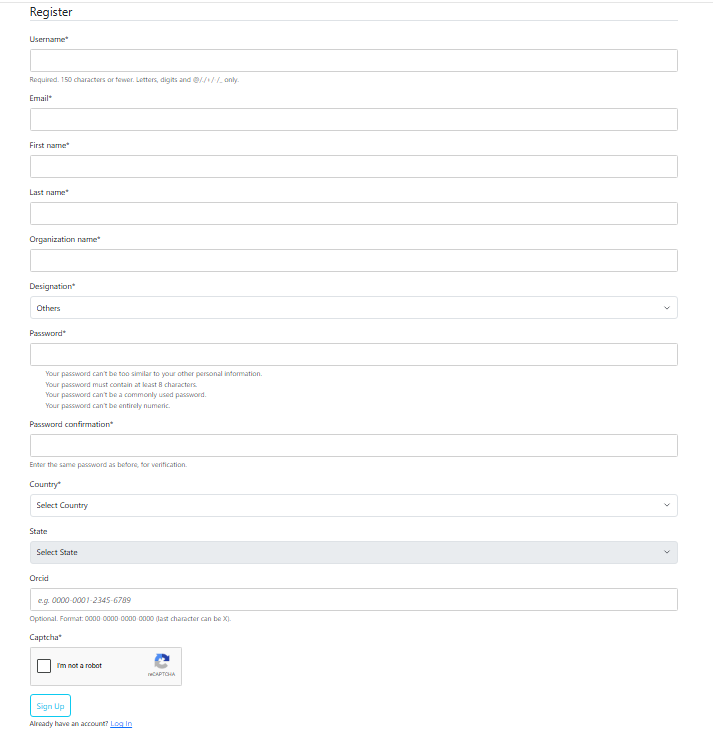
Select User Registration at the top of the ICPD home page. Your email address is your primary identifier and cannot be changed later without contacting support, so use an institutional address that will remain valid. After sign-up, an activation link is sent to that address; the account becomes usable once you confirm it.
| Field | Status | Requirement |
|---|---|---|
| Username | MANDATORY | 150 characters or fewer; letters, digits and @ . + - _ only |
| Email address | MANDATORY | Preferably Institutional address; serves as your primary identifier |
| First name and last name | MANDATORY | As you wish them to appear in the data record |
| Organisation | MANDATORY | Enter the full name of your organization |
| Designation | MANDATORY | Select from the dropdown |
| Country | MANDATORY | |
| Password | MANDATORY | At least 8 characters, including one digit, one uppercase and one lowercase letter. Common and all-numeric passwords are rejected |
| State | RECOMMENDED | |
| ORCID iD | RECOMMENDED | Links your deposits to your published record and makes your datasets attributable to you unambiguously |
The details you provide at registration are used to identify you as a submitter, to contact you about your submissions, and to attribute deposited datasets. Submitter names and affiliations appear in the public record of datasets you deposit.
5.2 User login #
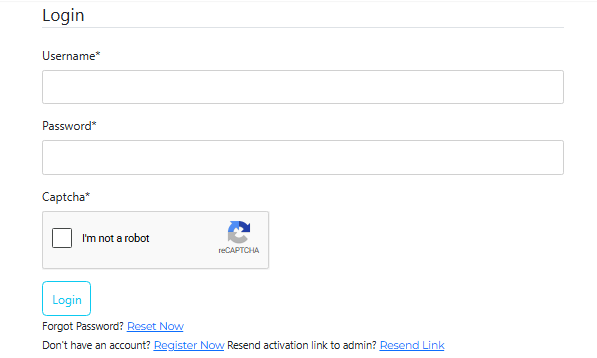
Log in with the username and password set at registration. Forgot Password, Register Now and Resend Activation Link are available on the login page.
5.3 User dashboard #
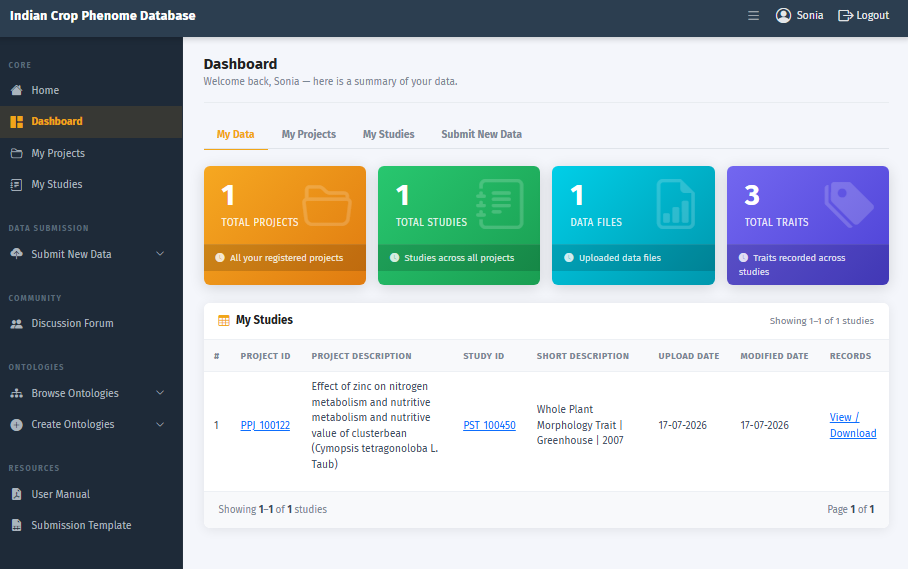
The dashboard lists your submission links on the left and your submission statistics in the centre, together with a summary of phenoprojects, studies and data files you have already submitted. Start a new submission with Submit New Data. The left panel also provides:
- Discussion Forum, for suggestions and questions about the submission process.
- Browse Ontologies, to search terms for traits, developmental stages, plant anatomy and methods.
- Create Ontologies, to propose a new term.
- Download User Manual, this guide.
- Download ICPD Submission Template, for the template-based route.
6. Web-based submission
The web-based route is recommended. It offers guided selection of ontology terms, validates entries as you go, and generates a pre-filled data template so that you only need to enter observations. The route has five steps.
Step 1. Register a phenoproject
Project title and description, grant number, funding agency, release date, crop scientific name(s)
Phenoproject accession PPJ_nnnnnn, shown at the top of the page and on My Project
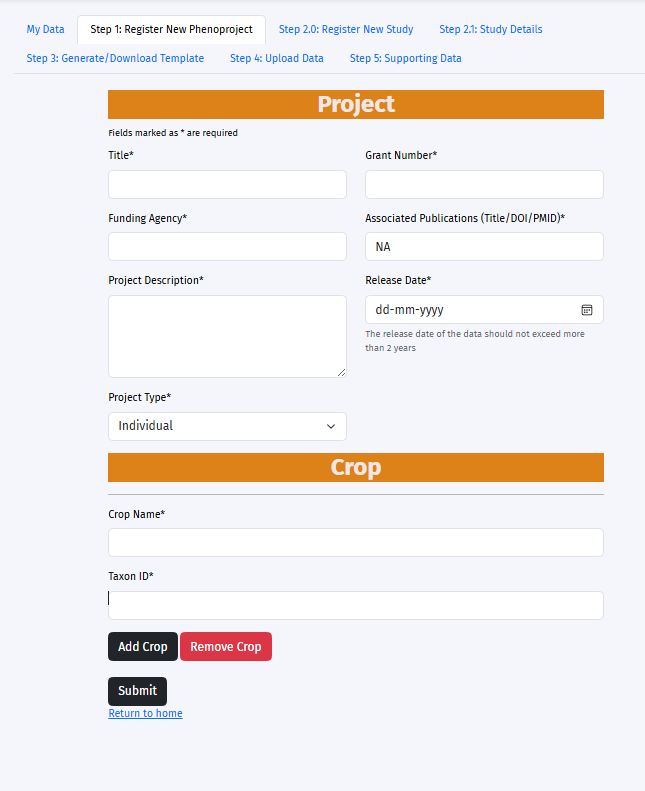
Click Submit New Data on the dashboard. The phenoproject registration form consists of several fields required to comprehensively define a new phenoproject. All the fields marked with asterisk are mandatory and others are optional for the users to provide. The form has a project section and a crop section.
Project section #
| Field | Status | Guidance |
|---|---|---|
| Title | MANDATORY | The project title as sanctioned |
| Project Description | MANDATORY | Abstract or summary of the proposal |
| Grant number | MANDATORY | As issued by the funder |
| Funding agency | MANDATORY | Name of the Funding Agency |
| Associated publications | RECOMMENDED | Title, DOI or PMID |
| Release date | MANDATORY | ISO 8601. Not more than two years from the date of registration. |
| Data license | MANDATORY NEW IN v3.0 | All data submitted to ICPD is licensed under Creative Commons (CC BY-NC-SA). |
| Project type | MANDATORY | Individual where there is a single principal investigator, or Consortium where several investigators from one or more institutions share the project. Selecting Consortium opens a Consortium Details section for the names, email, designation and affiliations of the investigators |
Crop section #
List the scientific name and NCBI Taxonomy identifier of every crop studied in the project. Just type the scientific name of the crop and the NCBI taxon ID will be automatically fetched from NCBI taxonomy. User can add multiple crop in one project.
On submission, the phenoproject accession is issued and displayed at the top of the page and will get updated on “My project” page.
Step 2. Register a study
The phenoproject accession; site, dates and experimental design; growth conditions; treatments; traits; author list
Study accession PST_nnnnnn
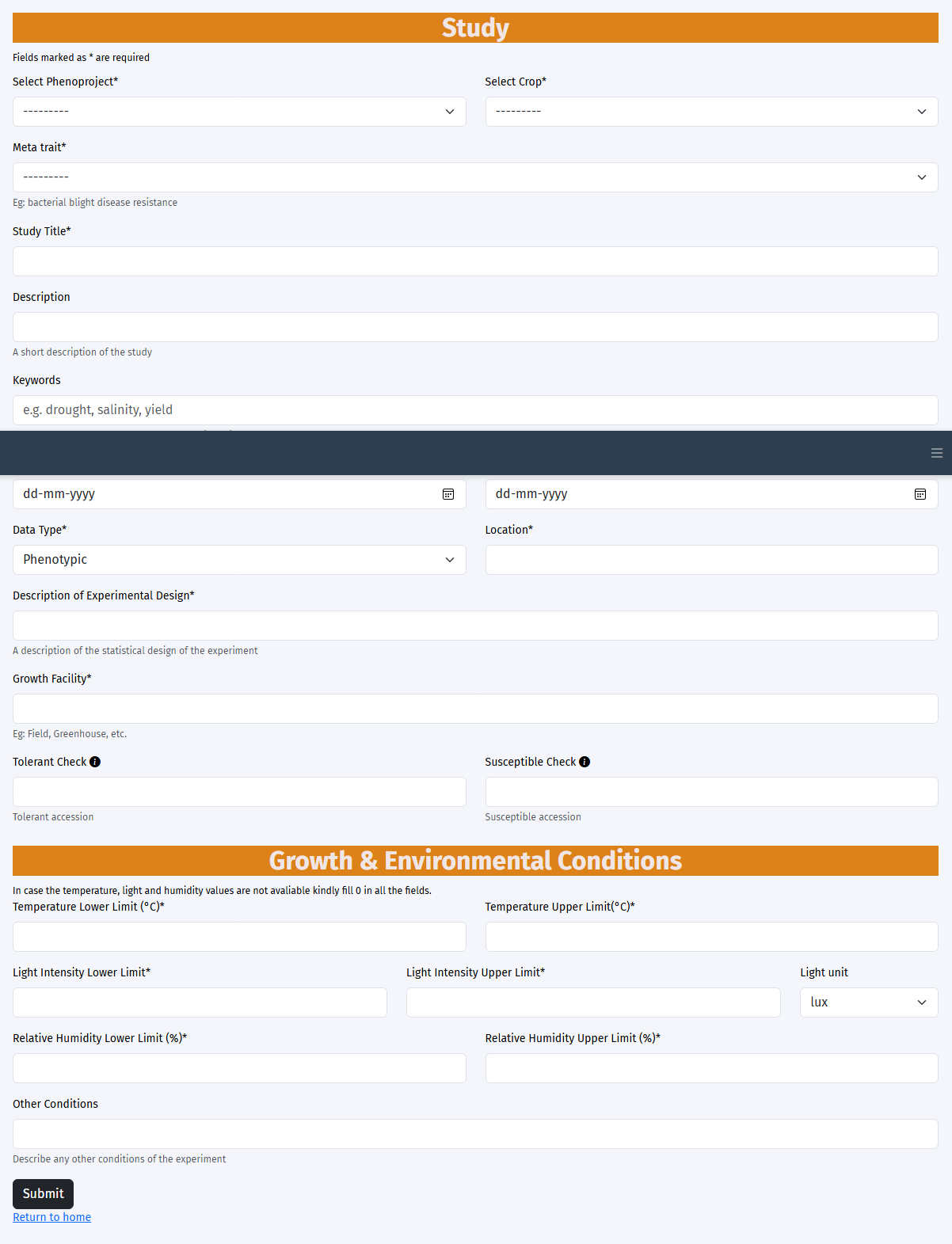
A phenoproject may contain one or many studies. Click Register New Study to add a study to a new or existing phenoproject. Remember the rule in section 3.3: one study covers one site in one season.
Step 2.0 Basic information #
| Field | Status | Guidance |
|---|---|---|
| Phenoproject ID | MANDATORY | Select from the dropdown |
| Crop | MANDATORY | Select from the dropdown. It automatically lists crops entered for the selected project. |
| Meta-trait | MANDATORY | The overarching trait the study investigates, for example drought tolerance. Type and select from the trait ontology drop down. |
| Study title | MANDATORY | Should identify the crop, the trait focus, the site and the season |
| Description | RECOMMENDED | What was done, on how many genotypes, under what design. Do not bury scoring scales here; record them against each trait |
| Start date, end date | MANDATORY | ISO 8601 |
| Data type | MANDATORY | Phenotypic |
| Site name (Location) | MANDATORY | The named research station, farm or facility |
| Description of Experimental design | MANDATORY | Name the design and state the number of blocks and replicates, for example augmented randomised complete block with 6 blocks and 3 replicated checks per block |
| Growth facility | MANDATORY | Field, greenhouse, growth chamber, rain-out shelter, net house |
| Tolerant checks, susceptible checks | RECOMMENDED | Genotype names exactly as used in the data file |
Growth and environmental conditions #
Record the conditions under which the trial was grown. Every value requires a unit. Where a condition varied over the season, record the range.
| Parameter | Unit | Notes |
|---|---|---|
| Air temperature, lower and upper | °C | State whether these are daily minima and maxima or absolute season extremes |
| Light intensity, lower and upper | lux | Unit applies to both limits |
| Relative humidity, lower and upper | % | |
| Other conditions | free text | Anything not covered above |
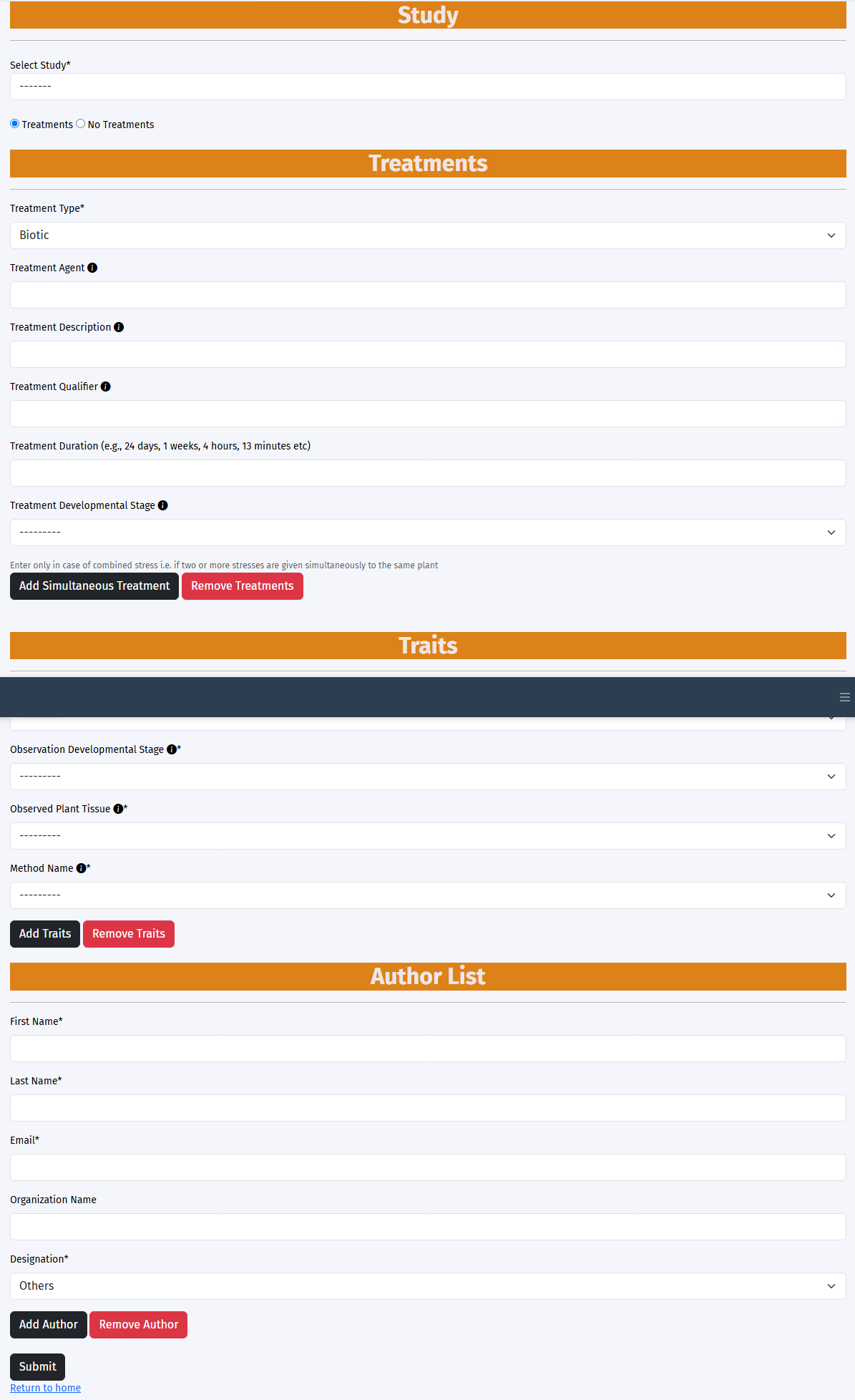
Step 2.1 Treatments #
A treatment is the experimental factor deliberately imposed on the plants. It is not something you measured. Record the factor, the levels it took, and how it was applied.
| Field | Guidance |
|---|---|
| Treatment type | Biotic, abiotic, or no treatment |
| Treatment agent | The imposed factor, selected from an ontology term, for example drought exposure (PECO:0007404) |
| Treatment Qualifier | It's the name and quantity of the agent |
| Treatment description | How the treatment was imposed and controlled. Describe the treatment, not the sampling or the downstream analysis |
| Treatment duration | For example 45 days |
| Treatment developmental stage | The stage at which the treatment was applied, as a Plant Ontology term |
Canopy temperature, chlorophyll content and relative water content are measured variables, not treatments. If you find yourself entering something you measured into the treatment agent field, it belongs in the Traits section instead. Where two treatments were imposed at the same time, use Add Simultaneous Treatment.
Step 2.1 Traits #
Declare every trait recorded in the study. A trait declaration in ICPD has five components, all of which are required for the data to be reusable.
| Component | Status | Guidance |
|---|---|---|
| Trait name | MANDATORY | Selected from Plant Trait Ontology or Crop Ontology, for example spikelet sterility (TO:0000436) |
| Observed plant structure | MANDATORY | Plant Ontology term, for example spikelet (PO:0009051) |
| Observation developmental stage | MANDATORY | Plant Ontology term, for example sporophyte reproductive stage (PO:0007130) |
| Method | MANDATORY | How the value was obtained. Name the instrument or the published scale and cite it |
| Scale and unit | MANDATORY | The unit for a measured quantity, or the named scale and its range for a score. |
Author list #
Provide first name, last name, email, organisation, designation and ORCID iD for each person who contributed to the study, together with their role, for example principal investigator, data curator or field technician. Press Submit. The study accession is issued on success.
Step 3. Generate and download the template
The study accession; the full genotype list including checks; the number of biological and technical replicates
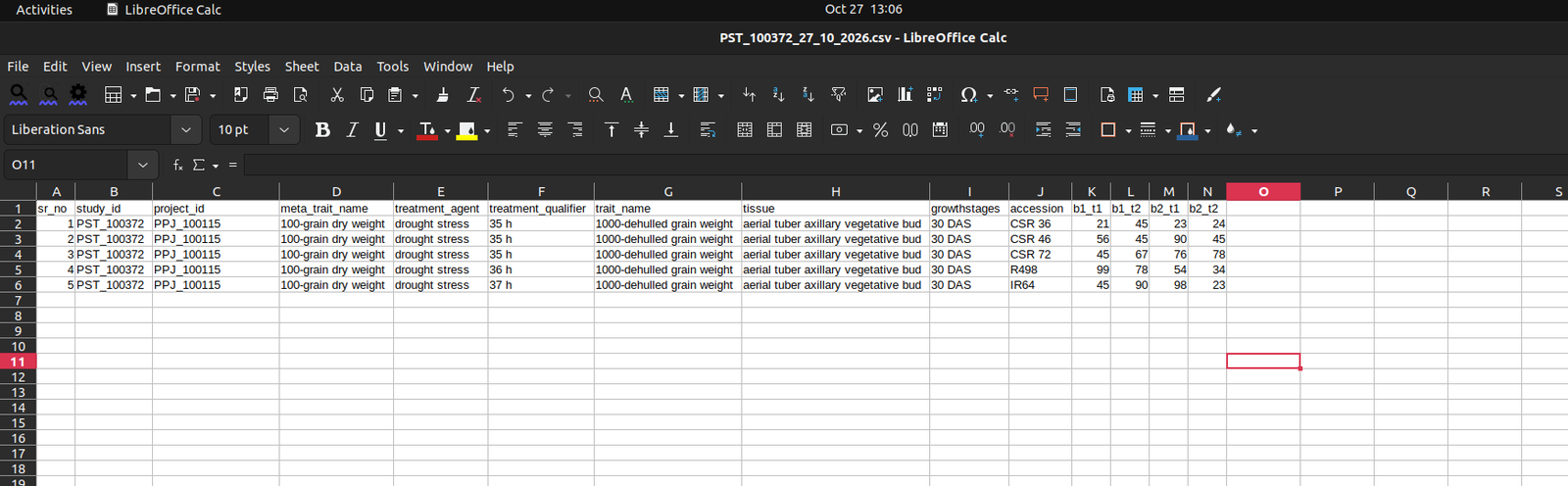
A template CSV with the identifying columns already filled in
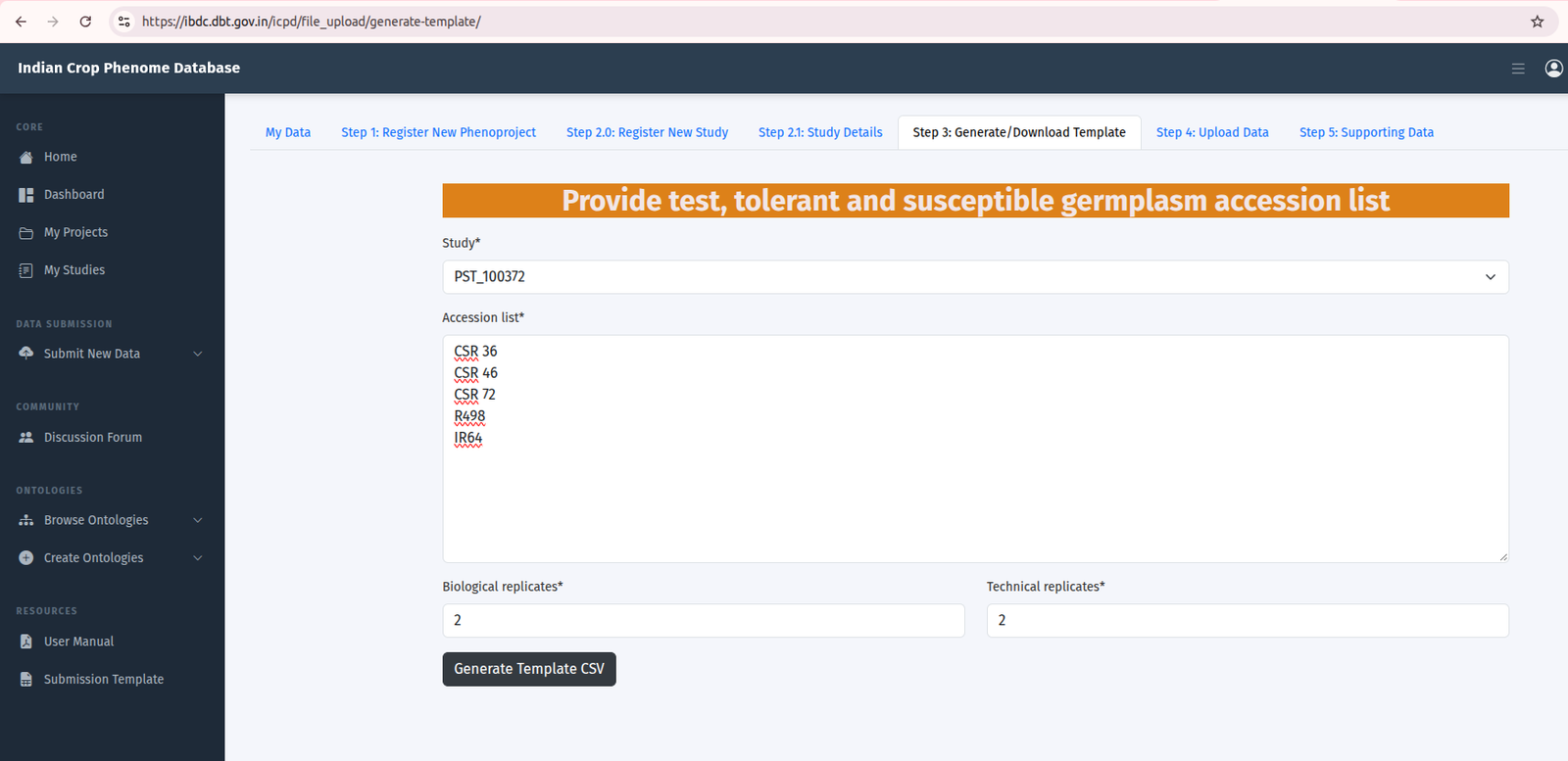
Once the study is registered, click Step 3: Generate and Download Template. Provide:
- the study accession;
- the full list of genotype names to be tested, including the tolerant and susceptible checks;
- the number of biological and technical replicates;
Click Generate Template CSV. The template downloads immediately with the identifying columns pre-filled. You can print it and use it as a field book, then enter the values on return.
Before you fill the template
- Do not add, remove, rename or reorder columns, and do not change the file format.
- Each genotype name must appear once in the genotype list you provide. Duplicated names cannot be resolved and the submission will be rejected.
- Use the same spelling of a genotype name everywhere.
N22andN-22are treated as two different genotypes. - Enter
NAfor a value that was not recorded. Do not leave a cell blank.
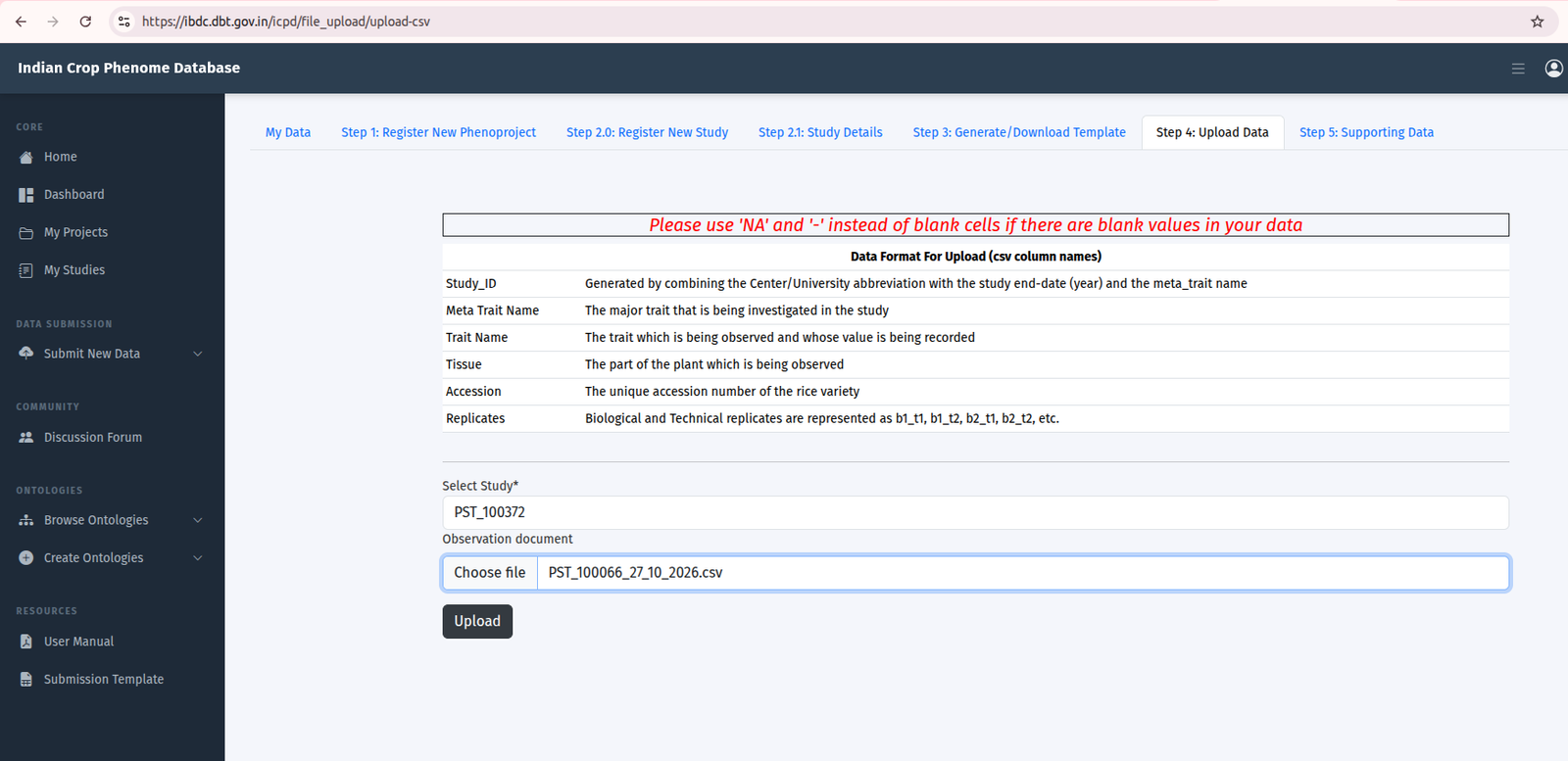
Step 4. Upload data
The completed template file
Automatic checks with row and column references for any error, then a data file accession PDT_nnnnnn
Click Step 4: Upload Data, select the study, browse to the completed file and upload. The file is checked automatically on arrival. If checks fail, the errors are reported with row and column references so that you can correct and re-upload. On success a data file accession is issued and your dashboard updates immediately.
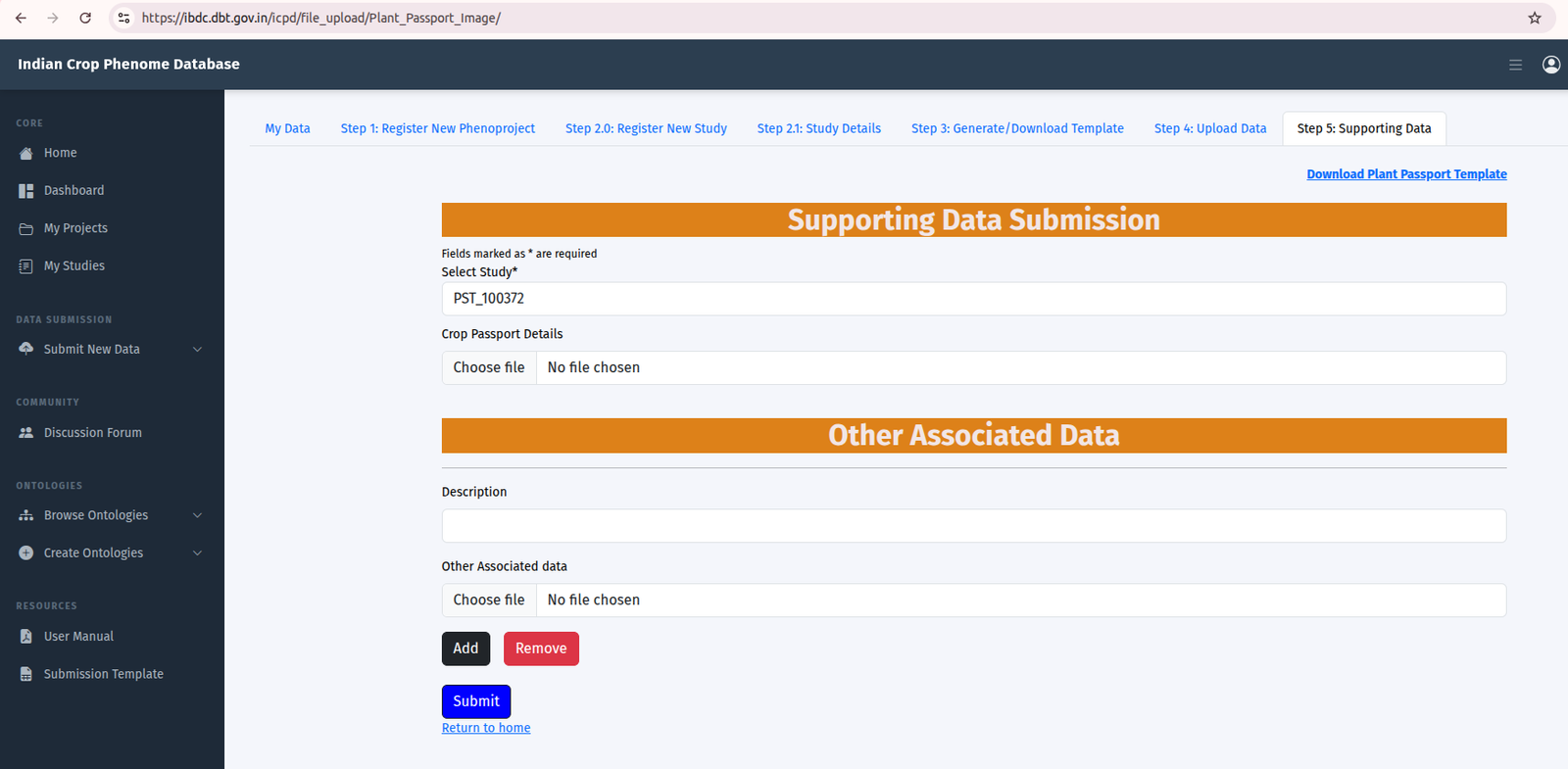
Step 5. Supporting data
Plant passport data, and weather, soil and field layout files if you have them
A study that other researchers can interpret and combine with their own data
Step 5 accepts the additional files that make a study interpretable. Download the relevant template, select the study, complete the file and upload it.
| Supporting file | Status | Content |
|---|---|---|
| Plant passport data | RECOMMENDED | Identity and source of every genotype in the study. |
| Weather data | RECOMMENDED | Daily or hourly records for the trial period from the nearest station |
| Soil analysis | RECOMMENDED | Texture, pH, organic carbon, available nutrients |
| Field layout or plot map | RECOMMENDED | Plan of the trial as laid out |
| Other | Optional | Protocols, scoring scale definitions, analysis scripts |
9. Passport and environment data
Passport data identifies the genetic material you evaluated. It is what allows a user in another institute to obtain the same material, or to recognise that your genotype and theirs are the same accession under different local names. The passport template follows the FAO and Bioversity Multi-Crop Passport Descriptors.
| Descriptor | Status | Guidance |
|---|---|---|
| Genotype name as used in the data file | MANDATORY | Must match the data file exactly |
| Genus and species | MANDATORY | |
| Infraspecific name | RECOMMENDED | Subspecies, variety or cultivar |
| Holding institute code | MANDATORY | FAO WIEWS institute code where available, for example IND001 for NBPGR |
| Accession number at the holding institute | MANDATORY | Written closed and without a space, as in IC558055, not IC 558055 |
| Accession name and synonyms | RECOMMENDED | Local names by which the material is known |
| Biological status | RECOMMENDED | Wild, landrace, breeding line, advanced cultivar |
| Country of origin | RECOMMENDED | ISO 3166 three-letter code |
| Collecting site and coordinates | Optional | Where the material was collected, if known |
| Pedigree or breeding history | Optional | For breeding lines and cultivars |
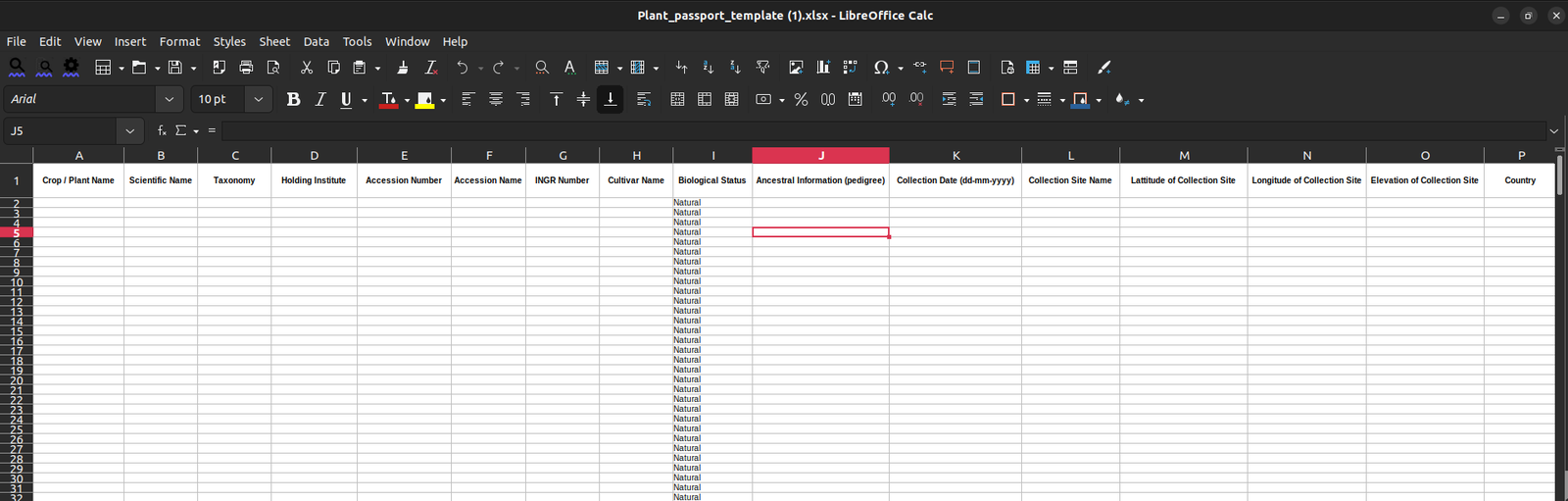
If your material has no genebank accession number, say so explicitly rather than leaving the field blank, and give whatever institutional identifier you do hold. A stated absence is informative; a blank is not.
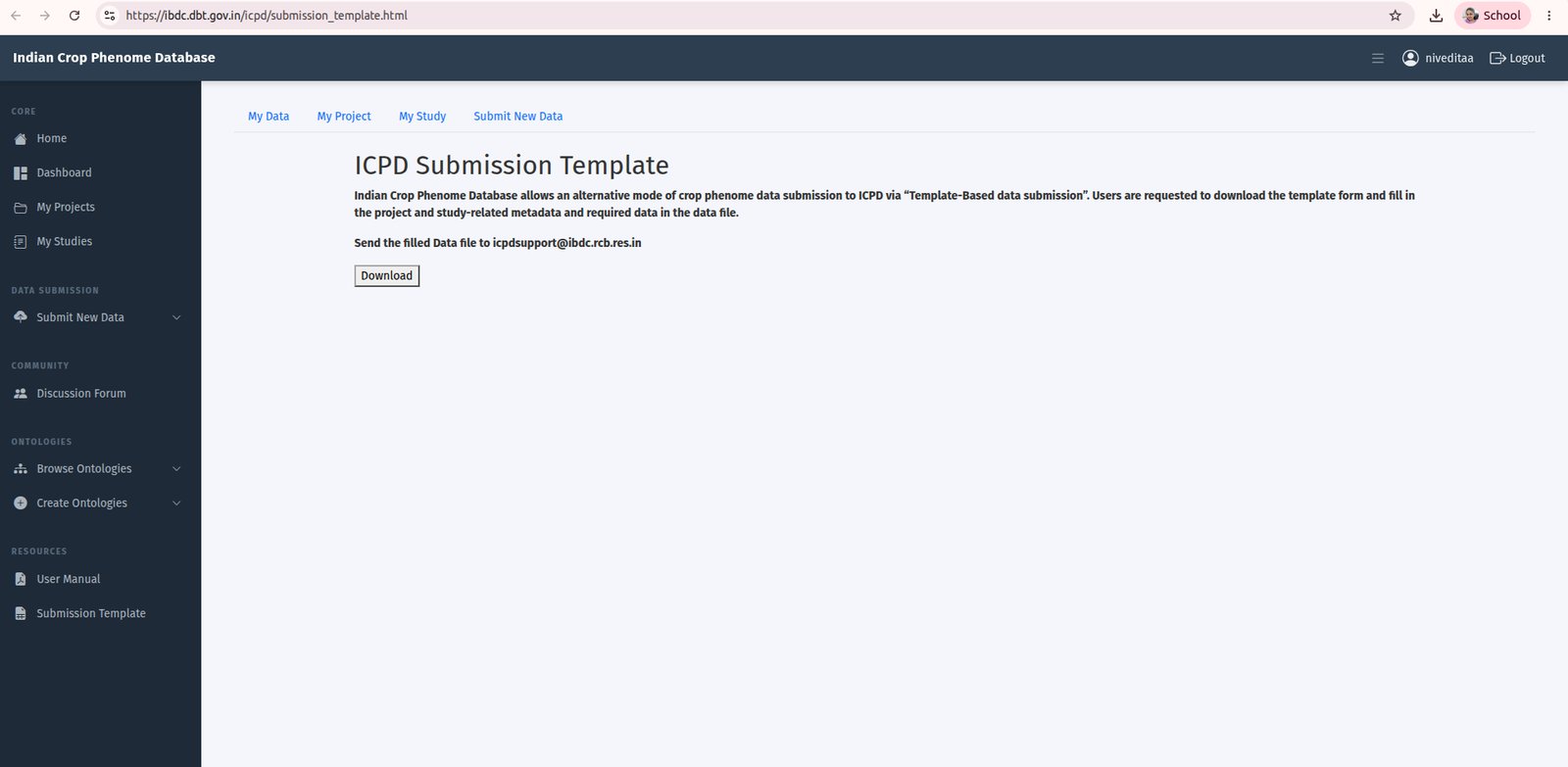
7. Template-based submission
Where the web interface cannot be used, ICPD accepts a completed workbook by email. This route receives the same curation as the web route but takes longer, because metadata that the web forms would validate on entry has to be checked by hand.
- Click Download ICPD Submission Template on the dashboard.
- Complete the phenoproject, study and data sheets, following the conventions in section 4.2.
- Attach the plant passport sheet.
- Email the workbook to ICPD support at icpdsupport@ibdc.rcb.res.in.
10. After you submit
Upload is not the end of the process. Every submission passes through automated validation and curator review before it becomes part of the archive.
| Stage | Timing | What happens |
|---|---|---|
| Automated validation | Immediate | File structure, encoding, required columns, identifier formats, genotype list consistency, replicate counts, ontology term resolution and numeric ranges are checked. Failures are reported to you with row and column references |
| Accession assignment | Immediate on passing validation | The data file accession is issued and appears in My Data |
| Curator review | A curator checks the metadata for completeness and internal consistency, reviews any provisional ontology terms, and may contact you for clarification | |
| Acceptance | The record is marked curated. You are notified | |
| Public release | On the declared release date | See section 11 |
11. Release, embargo and licence
You declare a release date when you register a phenoproject. Until that date the record is held privately and is visible only to you and to IBDC curators. On that date it is released publicly.
| Question | Answer |
|---|---|
| How far ahead can I set the release date? | Up to two years from the date you register the Phenoproject. |
| Is release automatic? | Yes. Records are released on the release date without further action from you. |
| Does publishing a paper that cites my accessions release the data? | Not automatically. If you cite ICPD accessions in a publication, request early release so that readers can access the data when the paper appears. |
| Can I release my data earlier? | Yes. Request early release from your dashboard or by writing to [ICPD helpdesk email]. |
| Can I extend the release date? | Yes, on request, provided the new date is [no more than two years from registration / confirm the overall limit]. Requests are reviewed by [IBDC curators / confirm approver] and must be made at least [N] days before the current release date. |
| Under what licence are released data available? | Creative Commons Attribution-NonCommercial-ShareAlike [4.0 International] (CC BY-NC-SA [4.0]). Users may share and adapt the data for non-commercial purposes, with credit to the submitter and ICPD, and must release derived works under the same licence. |
| Who holds the rights in deposited data? | [The submitter / the submitting institution]. By depositing, you grant ICPD the right to store, curate and distribute the data under the licence above. |
12. Correcting, updating and withdrawing data
Data in the archive can be corrected. Accession numbers, however, are permanent, and public records are not deleted. IBDC follows the data availability model used internationally, under which a record that should no longer be consulted is given a defined status rather than being erased.
| Situation | What to request | Effect |
|---|---|---|
| A metadata field is wrong | Metadata update | Corrected in place. No change of status. No new accession |
| Observation values were wrong and you have corrected them | New version of the data file | The corrected file supersedes the earlier one, which remains retrievable |
| The record has never been public and should not exist | Cancellation | The record is removed and the accession is retired |
| The record was released before you intended | Temporary suppression | Removed from browse and search but still retrievable by accession, and re-released on a new date you supply |
| The data are wrong and cannot be corrected | Permanent suppression | Removed from browse and search, still retrievable by accession, not re-released |
| Serious ethical, legal or consent grounds | Withdrawal | Not publicly available from IBDC by any means. Restricted grounds only |
Requests are made on form IBDC-DWS-01, Data Withdrawal and Suppression Request Form, available from the ICPD support team. Note that data which have been publicly available for any period may already have been downloaded by others, and IBDC cannot recall those copies.
13. Citing ICPD data
Cite the accession in the data availability statement of any publication that uses ICPD data, whether the data are yours or someone else's.
Suggested form. Author(s). Title of the study. Indian Crop Phenome Database, Indian Biological Data Centre. Accession PST_100118.
If you deposited the data yourself, cite your own accession in the paper that reports it. This is what makes the deposit findable and creditable, and journals increasingly require it.
14. Finding and reusing data
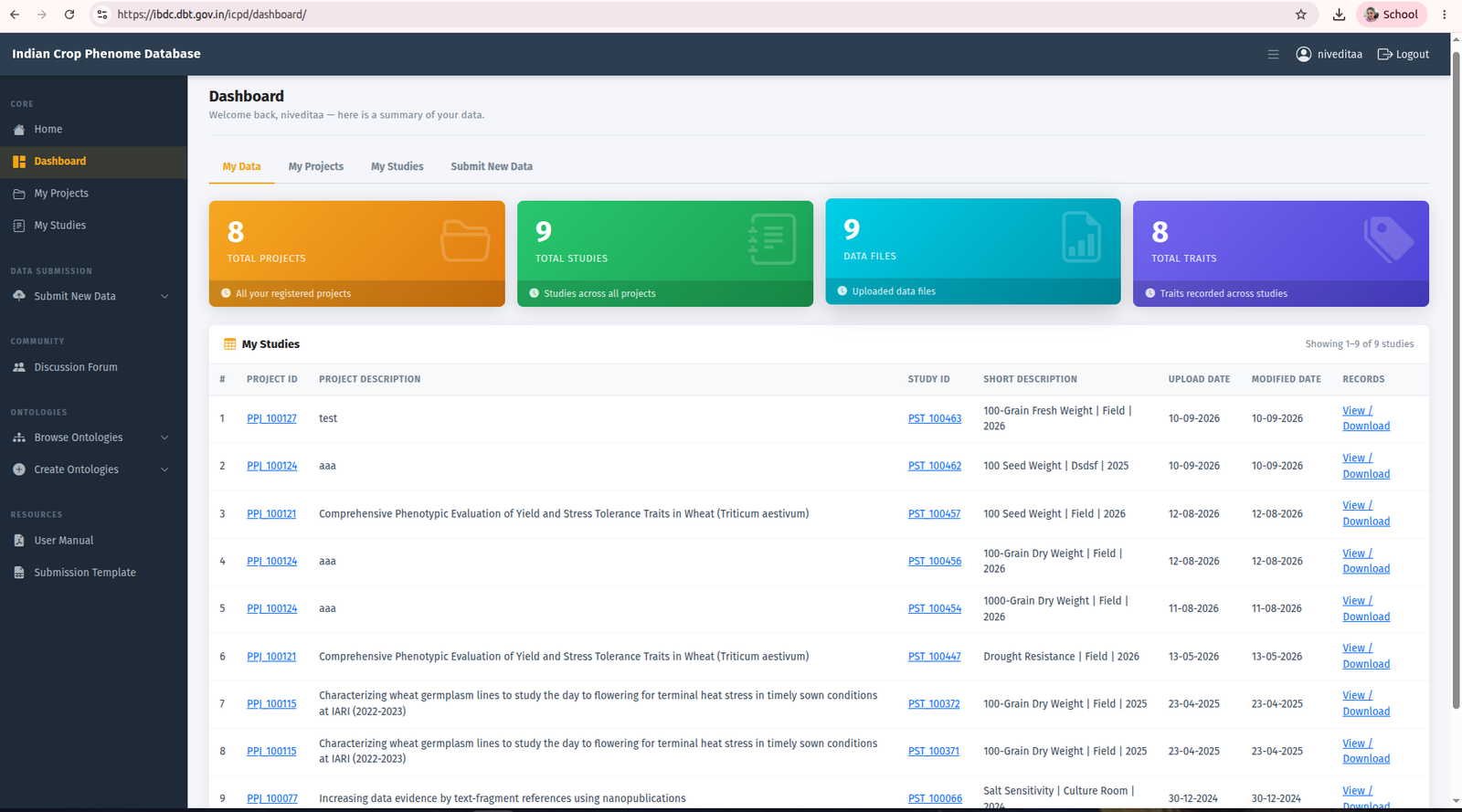
My Data #
Phenoprojects, studies and data files you have submitted appear under My Data on your dashboard. Metadata and data files can be viewed and downloaded at any time.
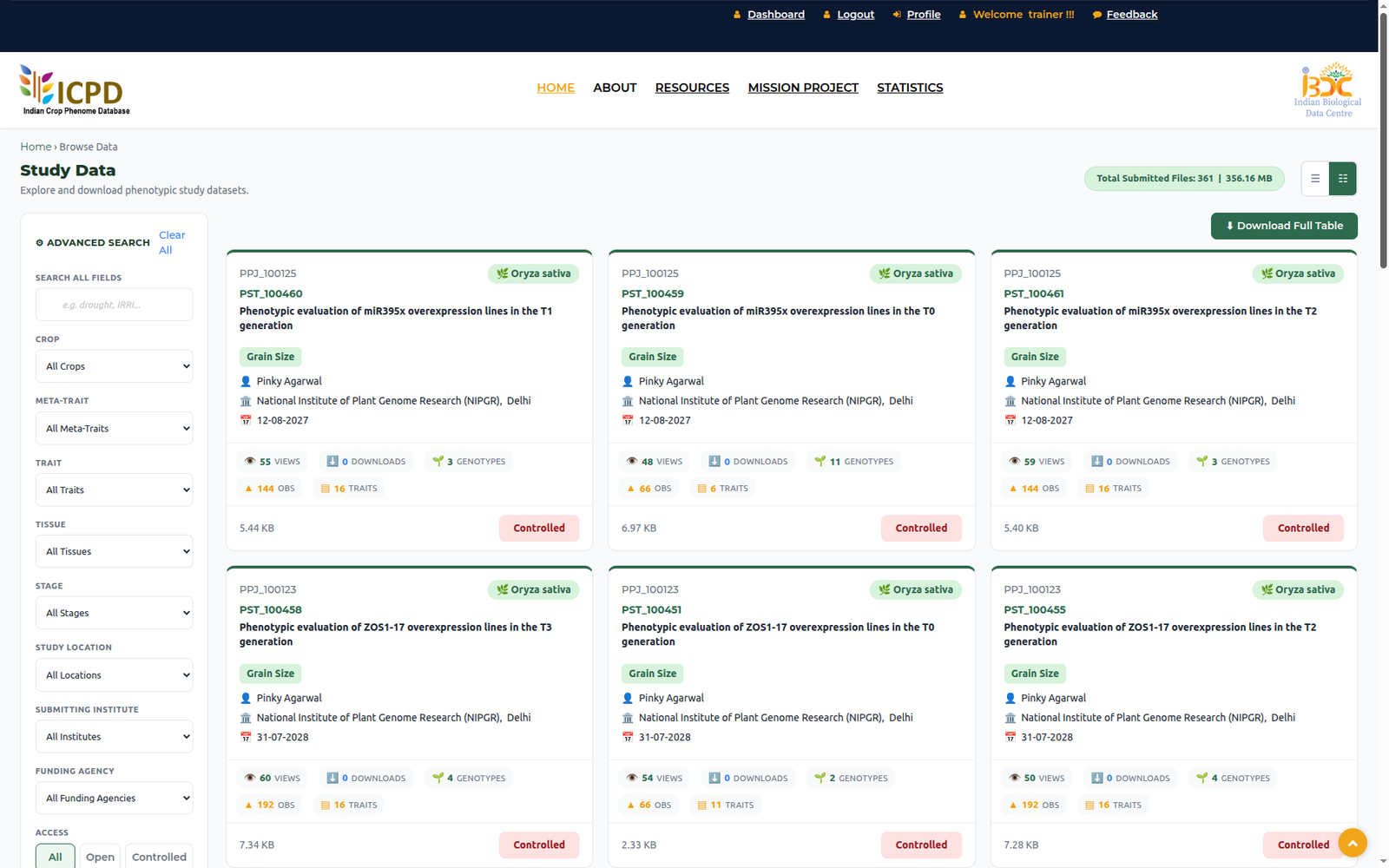
Browse Data #
Released phenoprojects, studies and data files can be browsed by any visitor from Browse Data on the home page, without registration.
15. Ontology browse and create
Consistent trait vocabulary is what makes phenotype data comparable across studies, so ICPD records traits, developmental stages, plant structures and methods as ontology terms.
- Browse Ontology searches meta-trait, developmental stage, trait and plant structure terms.
- Create Ontology Term proposes a new term where no suitable term exists.
Plant Ontology already covers plant anatomy and developmental stages comprehensively, so a genuinely new developmental stage or plant structure term is very rarely needed. New trait terms are more often justified, particularly for crop-specific traits. Creating a near-duplicate of an existing term makes your data harder to find, not easier.
Terms you propose are accepted immediately as provisional so that your submission is not held up. Provisional terms carry a local ICPD identifier, are displayed as provisional in your record, and are then reviewed against the Plant Trait Ontology, Plant Ontology, Plant Experimental Conditions Ontology and Crop Ontology. A provisional term is either mapped to an existing ontology term, in which case your record is updated and you are notified, or promoted to a permanent ICPD term.
16. Support
For questions, suggestions and help with a submission, write to the ICPD support team at icpdsupport@ibdc.rcb.res.in
Introductory material is also available on video:
- ICPD webinar: https://youtu.be/Grx973vAelM
- Short introduction to ICPD: https://youtu.be/B-WjgpD57ag