
FAQ
1. What is ICPD?
Ans. Indian Crop Phenome Database (ICPD) is a domain of the Indian Biological Data Centre (IBDC), Regional Centre for Biotechnology, Faridabad, developed for the digitization of crop phenome data. Being the global agricultural powerhouse, the bulk of biological data generated in India is associated with agricultural trials. Ironically most of the trial data has been inaccessible to other researchers, and remains unpublished, and is lost as time passes. Therefore, ICPD would act as single-stop user-friendly platform for freely archiving, organizing, analysing, and sharing the multi-crop phenome data following FAIR (Findable, Accessible, Interoperable and Re-usable) data principles. We assign unique and persistent IBDC accessions to data submitted to ICPD.
2. What kind of data can I submit to ICPD?
Ans. Following type of phenome data can be submitted in ICPD:
| Sr. | Data Category | Technology | Formats |
|---|---|---|---|
| 1 | Phenotypic traits | Manual scoring, digital tools | CSV, XLSX |
| 2 | Physiological traits | Sensors, gas exchange | CSV, XLSX |
| 3 | Agronomic field data | Field books | CSV, XLSX |
| 4 | Stress phenotyping | Field/controlled stress | CSV, XLSX |
| 5 | High-throughput phenotyping | Imaging platforms | PNG, JPG, TIFF, CSV |
| 6 | Environmental data | Weather stations | CSV, NetCDF |
| 7 | Soil data | Soil testing | CSV, XLSX |
| 8 | Genotype metadata | Passport systems | CSV, XLSX |
| 9 | Image-derived traits | Image analysis | CSV |
| 10 | Time-series data | Automated sensors | CSV, HDF5 |
| 11 | Nutritional & quality traits | Lab assays | CSV, XLSX |
| 12 | Derived indices | Statistical tools | CSV |
| 13 | Associated data | Any | Any |
| 14 | Ontology & Metadata | MIAPPE tools | CSV, XLSX, JSON |
3. Which information is stored in Phenoproject, Study and data file?
Ans. Phenoproject is the collection of multiple phenotyping studies aims towards a single broad objective. A phenoproject can have any number of studies. Each study is the collection of experiments performed under unique developmental stage, external environment and growth conditions. A study can have a single Meta Trait and multiple traits compiled in a single data file.
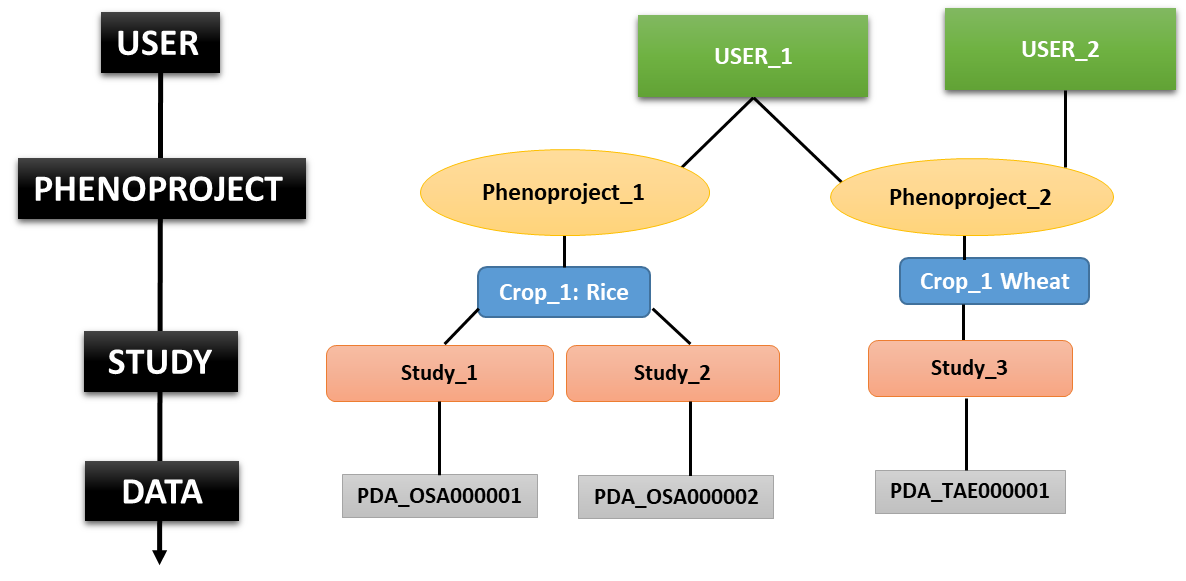 Figure 1. Modules used in ICPD.
Figure 1. Modules used in ICPD.4. Can I submit my data directly in the database?
Ans. No, you first need to Register yourself at the ICPD portal. Then using the login details created by yourself, you can submit data anytime directly as per steps summarized in Figure 2.
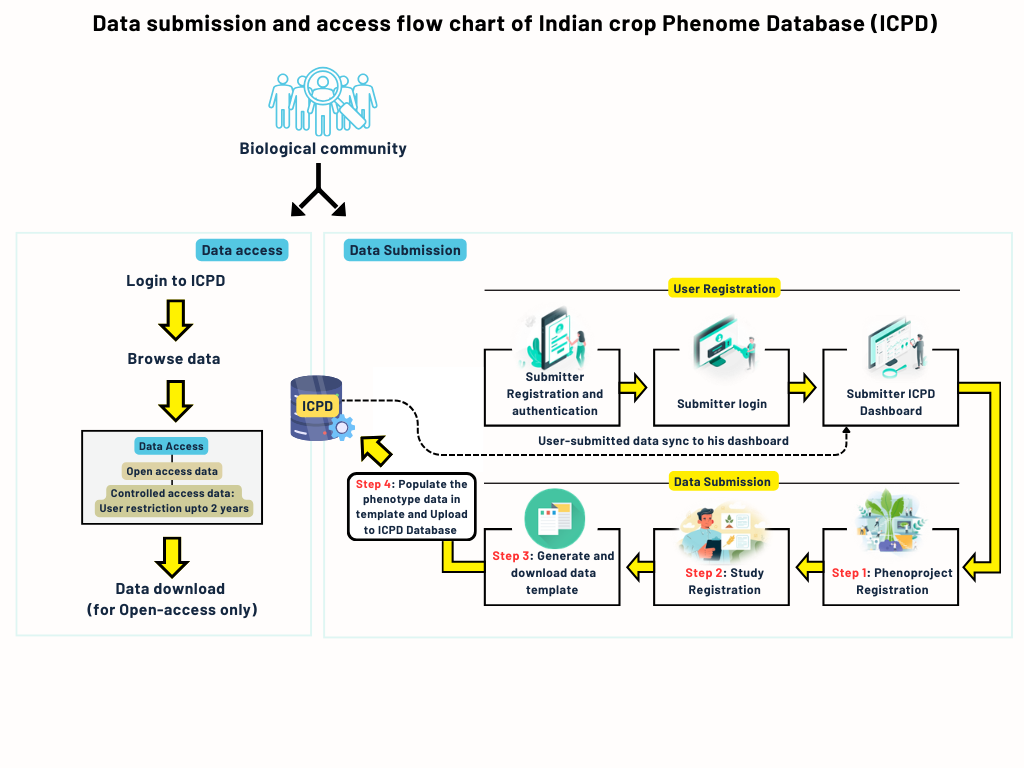 Figure 2. The overview of steps required for the phenome data to ICPD.
Figure 2. The overview of steps required for the phenome data to ICPD.5. Is my data safe in the database?
Ans. Absolutely. The actual data shall not be shared with anyone until and unless the submitter specifies so. The database management staff shall not use the data for any of their research work without the permission of the submitter.
6. What if I can’t find the meta trait/trait/plant part included in my study in the ontologies existing in the database?
Ans. You can easily create any ontology yourself by clicking on the ‘Create Ontologies’ tab on the menu panel on the left side of the page. Go to the relevant Ontology tab and simply create a new ontology by giving it an appropriate name and description. But before creating a new one, kindly ensure that the term you need does not exist in the database.
7. Do I need to fill all the Growth Parameters used in the study? What if I don’t have any one of them?
Ans. The Growth Conditions being asked in the database are the basic necessary details required for a comprehensive description of the study according to the FAIR (Findable, Accessible, Inter-operable, Reusable) principles. Kindly ensure you have all these parameters while registering your study.
8. What are biological and technical replicates in Step 3?
Ans. Biological replicates consist of plants that are kept under observation and/or subjected to treatment, and for which the trait values are recorded. Technical replicates are multiple plants/observations taken within a biological replicate. For instance, in a field design, three plants (three technical replicates) make up one block of plot (one biological replicate) in a field of 10 blocks (hence 10 biological replicates) placed at appropriate edges/centres of the field. In any biological experiment, at least three biological replicates are advised for performing any statistical analysis on the observation records.
9. What is the Test, Tolerant and Susceptible germplasm accessions List in Step 3?
Ans. This is the list of valid germplasm accessions for which data has been recorded and shall the uploaded along with the tolerant and susceptible germplasm which are used as known controls for the study.
10. What should be the format of the data file to be uploaded?
Ans. The data file should be in .csv format- the same as the template downloaded in Step3. Kindly do not remove any field or column from the generated template.
11. What if I have blanks in my data file? What if some accessions did not germinate during the experiment?
Ans. Kindly use NA or – for any blank values in the data file, even for any variety/accession that did not germinate.
12. Can I change any values in the generated template file?
Ans. No, please do not change any pre-filled values in the generated template file. Changing those values might not allow the file to upload as it will fail the QC of the database.
13. What are the headers given in the template file?
Ans. A description of the headers is given on the Step 3 page. These are values taken from the description of the study you have registered in Step 2.
14. What is the unit of light intensity required for submission?
Ans. You can fill either lux units or µmol/m2/s units of light intensity.
15. Can I fill multiple traits in the same template file?
Ans. Yes, you can. While registering the study you can use the ‘Add Traits’ option to add as many traits as you have recorded for the same growth conditions and treatment subjected to the plants. The template generated will display the traits for each of the accession staggered below each other.
16. If there is a single change in my Growth Conditions while rest of the parameters of the experiment remain the same, what should I do?
Ans. Since the Growth Conditions differ; hence you need to register new study. The premise of the data filled in the templates lies on the fact that the plants were subjected to uniform growth and treatment parameters. If any of the two changes, then a new study would be required to be registered.
17. Can I edit my study after submission?
Ans. We do not provide that facility right now. However, in case of any emergency please contact the database management for the same.
18. What are Treatment Agent and Treatment Qualifier? How are they different from each other?
Ans. Treatment Agent refers to the name of the Biotic/Abiotic condition or No Treatment subjected to the plant. Treatment Qualifier refers to the specific strain name of the pathogen in case of biotic stress and concentration of the treatment agent in case of abiotic stress. For instance, in case of salinity stress, NaCl would be Treatment Agent while 100 mM would be Treatment qualifier.
19. What if I am subjecting my plants to a combination of stresses at the same time?
Ans. In case of a combination of two or more stresses, one can click on the ‘Add Simultaneous Treatment’ button in the ‘Treatments’ section of Step 2 and add as many as simultaneous treatments as you may require. The generated template would reflect the same.
20. What if I have not used any ‘Check’ germplasms in my study?
Ans. Although the use of a ‘high trait’ and a ‘low trait’ germplasm is ideal for phenotypic experiments; in case you have not used these in your experiment you may leave those tabs empty while registering your study. These fields are not mandatory and leaving them empty would not hamper the submission process.
21. What is ‘Observation Developmental Stage’? How is it different from ‘Treatment Developmental Stage’?
Ans. ‘Observation Developmental Stage’ refers to the stage at which the final trait values are recorded. ‘Treatment Developmental Stage’ refers to the plant stage at which treatment was given. These two would be different if the treatment is continued for a number of days or the trait is recorded after a number of days post treatment. The treatment duration can be mentioned in the ‘Treatment Description’ tab.
22. How can I contact ICPD support?
Email: icpdsupport@ibdc.rcb.res.in